


Jellyfin for Android TV
4.5111.00 Reviews
App Specs
- Version
- 0.19.10
- Updated On
- License
- Free
- Downloads
- 1,000,000+
- Developer
- Jellyfin
- Categories
- Video Players & Editors
- Platform
- Android
Screenshots
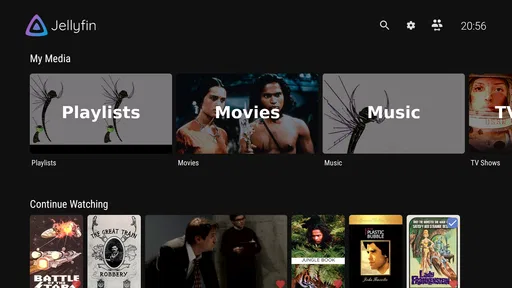
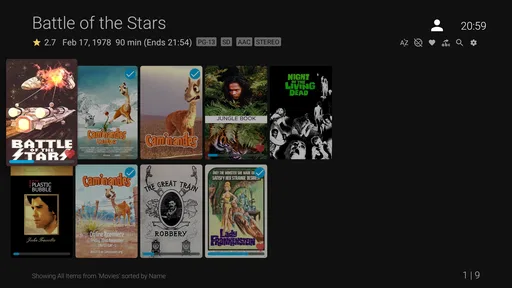

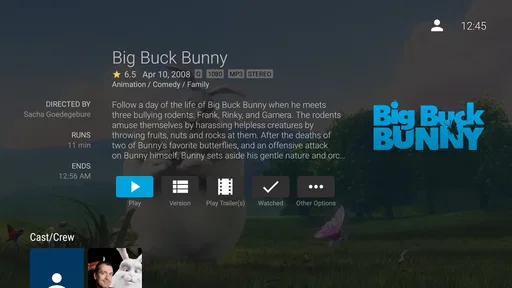
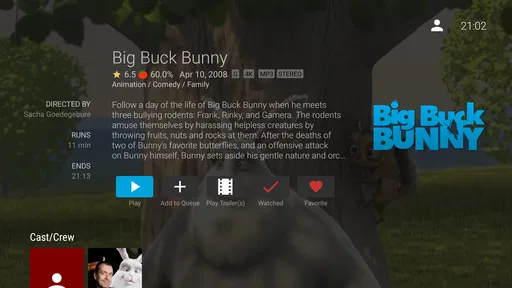

 Analysis by AppCompare
I like the idea of keeping a personal video library, but the part that can trip people up is that Jellyfin for Android TV is a viewer for a Jellyfin server, not a streaming service that supplies films and shows. That distinction matters before you install it: the TV app needs a server that is already set up and reachable, along with media you’re allowed to access. When those pieces are in place, it can make a living-room library feel much more organized than browsing folders or plugging in a drive.
First, check where your library lives
Before troubleshooting the television, I’d work out which device hosts the server and whether it stays on while you watch. A computer that sleeps, a storage device that disconnects, or a server that is only available on your home network can make the TV app appear unreliable even when the app itself is behaving normally. For everyday use, a host that remains available is more convenient than a laptop you close after work.
It also helps to separate two questions: can the TV reach the server, and can the server find the media? If the library is empty or missing a title, repeatedly reinstalling the TV app is unlikely to fix the underlying issue. Check the library and server first; then return to the television once you know the content is visible there.
Small setup checks that save time
When the app cannot connect, I’d confirm that the server is running and that the address entered on the TV belongs to that server. If the server’s address has changed, the TV may still be trying the old one. I’d also check that both devices are on a network that allows them to communicate rather than assuming that sharing the same Wi-Fi name guarantees access.
For a first test, choose one familiar title and try to play it before adjusting a lot of settings. That gives you a simple baseline: if the library appears but playback fails, the problem is different from a connection failure or an empty library. Making one change at a time is less frustrating than altering the server, network, and playback options together, because you can tell which change actually helped.
How I’d recover a playback problem
If a video stalls, I’d first retry a different item and then try the same item on another device, if one is available. A single file failing points toward that title or its format; every title failing points more toward the connection, server availability, or a broader setup issue. This isn’t a guarantee of the cause, but it narrows the search without turning a simple hiccup into a full reinstall.
I’d also distinguish buffering from a complete inability to start playback. Buffering can come from a weak or busy connection, while a server that has gone offline can prevent the app from reaching the library at all. If the issue only happens with certain files, checking whether the server can handle them is more useful than assuming the TV interface is at fault.
Worth Reading Before You Choose

Flipboard Shows What News Apps Must Do Beyond the Feed

Switching to Android Auto Means Rethinking Your Driving Routine

Google Calendar Makes a Crowded Week Easier to Manage

Ludo King Makes the Most of the Minutes Between Plans

Baby Panda World Brings Quick Play to Modern Phones, but Its Game Library Feels Busy

ESPN’s Live Game View Makes Following Close Games Easier
When the television app isn’t the culprit
A TV app can only show what its server makes available. Missing artwork or a title filed under the wrong section may be a library organization or metadata issue, not a display bug. Likewise, a profile that does not show the same items as another family member may reflect the way the server’s users and access are configured. I’d compare the same library from another client before changing settings on the TV.
Remote viewing deserves a separate check from watching at home. A server that works on the household network may not automatically be reachable from elsewhere; the host and network must be arranged for that use. I’d confirm that access deliberately rather than treating a successful home test as proof that travel viewing will work.
Setting Up and First Impressions
Getting Jellyfin up and running was surprisingly smooth. The app is available for free on the Google Play Store, which is always a plus. Installation was a breeze; just a few taps here and there, and I was ready to explore. The interface is sleek, with a dark theme that’s easy on the eyes—perfect for late-night binge sessions.
The initial setup involves connecting to a Jellyfin server. Now, don't let the "server" jargon scare you off. If you're a bit tech-savvy, you can set this up on your own device or a dedicated server. If not, there are plenty of guides out there to walk you through the process. Once connected, all your media is ready to stream straight to your TV. It felt like having my personal Netflix, tailored just for me.
Features That Stand Out
One of the standout features of Jellyfin is its ability to organize media. Whether it’s movies, TV shows, music, or even audiobooks, everything is neatly categorized. The metadata fetching is pretty spot-on, pulling in cover art, cast info, and synopses without a hitch. It's like having your own personal media library, but with all the bells and whistles.
Another neat feature is the support for multiple users. This means that each member of the family can have their own profile, complete with personalized watchlists and viewing history. Plus, there are options for parental controls, which is a lifesaver if you've got little ones.
Let's not forget about the plugins. Oh, the plugins! They allow you to expand functionality, from adding subtitles to integrating with live TV. The community behind Jellyfin is pretty active, so there are always new features and improvements on the horizon.
Performance and Usability
In terms of performance, Jellyfin holds its ground. Streaming is smooth, even with high-definition content. I tested it on a decent Wi-Fi connection, and there were no hiccups or buffering issues. The app is responsive, and navigation is intuitive. You won't find yourself lost in menus or struggling to find your favorite show.
The app is also open-source, which gives it a leg up in terms of customization and security. You can tweak it to your heart’s content, ensuring it suits your exact needs. And knowing that the community continually audits and improves the code is a reassuring thought.
A Few Things to Consider
While Jellyfin is a powerhouse, it might not be for everyone. Setting up a server might seem daunting to those who prefer plug-and-play solutions. However, if you're willing to invest a little time, the payoff is significant.
Also, the app relies heavily on your existing media collection. So, if you're looking for a service that provides content like Netflix or Hulu, you might need to look elsewhere. But if you’ve got a robust library of your own, Jellyfin will make it shine.
A natural fit for shared living rooms
The setup is especially useful when several people watch from the same television but want their own place in the library. Separate profiles can make it easier to keep viewing histories and watchlists from blending together. For a household, I’d set up profiles before everyone starts using the TV, then check that each person lands in the intended account. That small bit of organization can prevent a child’s viewing history or a shared “continue watching” row from becoming a muddle.
There’s also a practical advantage for people with a carefully curated collection: the catalog is yours to arrange and maintain rather than a rotating selection from a subscription service. The trade-off is responsibility. If a title has poor naming or incomplete information, the attractive library view depends on fixing the source organization or metadata rather than expecting the television app to make every file perfect automatically.
Choosing it over familiar TV options
Compared with the usual video-player apps, Jellyfin is built around a server-managed collection, not just opening one file at a time. That makes it more comfortable for browsing a substantial home library, but less convenient if your only goal is to play a video from a USB drive or cast a single clip. Compared with paid streaming services, it gives you control over your own catalog rather than a ready-made catalog; it does not replace those services for viewers who want licensed shows available without managing a media server.
I’d also think about how much maintenance I’m willing to take on. A plug-and-play subscription is simpler for someone who wants to press play and leave all the organization to another company. Jellyfin suits someone who is happy to maintain a server and values being able to bring their own collection to the TV. The app is free, but “free” here does not mean the whole arrangement requires no effort: the server, library, and network still need to be looked after.
Everyday use without turning it into a project
A realistic routine might be adding a film to the home library during the week, checking that it appears correctly on the server, and then opening it from the television on movie night. If it does not show up, I’d check the server’s library view before searching through TV menus. If it appears but will not play, I’d try another title and then check the server and connection. Keeping those checks in that order makes the experience feel manageable rather than like a technical project every time something goes wrong.
One useful habit is to test the setup while you are at home and have time to fix it, rather than waiting until guests are sitting down to watch. I’d also avoid changing several server or network settings just to solve one troublesome file. A repeatable check—server online, correct profile, title visible, then playback—helps identify whether the snag is account-related, library-related, or specific to a video.
Who should look elsewhere
I would skip this app if I wanted a ready-to-watch catalog, had no interest in managing a server, or mainly watched videos stored directly on the television. It is also a poor match for someone expecting every file to play identically without regard to the server, network, or media itself. In those cases, a mainstream streaming app or a straightforward local player is likely the less demanding choice.
For someone deciding whether to try it, the useful question is not simply whether the interface looks appealing; it is whether the household already has a library worth organizing and a device that can host the server. If the answer is yes, the TV app can be a convenient front door. If the answer is no, installation alone will not create a personal catalog.
Features That Stand Out
One of the standout features of Jellyfin is its ability to organize media. Whether it’s movies, TV shows, music, or even audiobooks, everything is neatly categorized. The metadata fetching is pretty spot-on, pulling in cover art, cast info, and synopses without a hitch. It's like having your own personal media library, but with all the bells and whistles.
Another neat feature is the support for multiple users. This means that each member of the family can have their own profile, complete with personalized watchlists and viewing history. Plus, there are options for parental controls, which is a lifesaver if you've got little ones.
Let's not forget about the plugins. Oh, the plugins! They allow you to expand functionality, from adding subtitles to integrating with live TV. The community behind Jellyfin is pretty active, so there are always new features and improvements on the horizon.
Performance and Usability
In terms of performance, Jellyfin holds its ground. Streaming is smooth, even with high-definition content. I tested it on a decent Wi-Fi connection, and there were no hiccups or buffering issues. The app is responsive, and navigation is intuitive. You won't find yourself lost in menus or struggling to find your favorite show.
The app is also open-source, which gives it a leg up in terms of customization and security. You can tweak it to your heart’s content, ensuring it suits your exact needs. And knowing that the community continually audits and improves the code is a reassuring thought.
A Few Things to Consider
While Jellyfin is a powerhouse, it might not be for everyone. Setting up a server might seem daunting to those who prefer plug-and-play solutions. However, if you're willing to invest a little time, the payoff is significant.
Also, the app relies heavily on your existing media collection. So, if you're looking for a service that provides content like Netflix or Hulu, you might need to look elsewhere. But if you’ve got a robust library of your own, Jellyfin will make it shine.
At a glance, and my practical verdict
This Android TV app comes from Jellyfin and is in the video player and editor category, though its real purpose is easier to understand as a living-room client for a personal media server. It is free, rated for Everyone, and has an average rating of 4.4 from around 2.8 thousand ratings, with over a million installs. Version 0.19.9 supports Android 5.0 and newer; it first appeared on July 25, 2019. Those details make it easy to find in the catalog, but the server requirement is what should guide your decision.
My recommendation is straightforward: if you already use Jellyfin at home, or you’re willing to set up a server and maintain your own library, this is a sensible way to bring that collection to an Android TV screen. If you want a service that supplies shows immediately, choose a subscription platform instead. The app’s strongest quality is not that it removes every setup step; it is that, once the server and library are in good shape, it gives your own media a comfortable, organized place in the living room.
The Verdict
All in all, Jellyfin for Android TV is a fantastic choice for anyone wanting to take control of their media streaming experience. It’s flexible, feature-rich, and completely free. If you're tired of the subscription model and want something that's truly yours, Jellyfin might just be the answer. So, go ahead, give it a whirl, and enjoy your personal media empire.
Pros
- Open-source and free to use.
- Supports a wide range of media formats.
- Customizable user interface.
- Regular updates and community support.
- No ads or tracking.
Cons
- Setup can be complex for beginners.
- Requires a dedicated server.
- Limited official plugins.
- May experience occasional bugs.
- Not as polished as commercial apps.
FAQs for Jellyfin for Android TV
What is Jellyfin for Android TV and what does it offer?
Jellyfin for Android TV is an open-source media server that allows you to manage and stream your media library, including movies, TV shows, music, and photos, directly to your Android TV. It offers a user-friendly interface, support for multiple users, and no subscription fees, making it a cost-effective solution for managing your media content.
Is Jellyfin for Android TV easy to set up and use?
Yes, Jellyfin for Android TV is designed to be user-friendly. The installation process is straightforward, and once installed, the interface is intuitive. You can easily organize and access your media files, and the app supports a variety of formats. The community and online documentation provide ample support for troubleshooting and setup assistance.
Does Jellyfin for Android TV support multiple users and profiles?
Yes, Jellyfin for Android TV supports multiple users and profiles, allowing each user to have a personalized experience. This feature is particularly useful for families or shared living spaces, as it enables each person to maintain their own watchlists, preferences, and viewing progress without interfering with others.
What are the system requirements for running Jellyfin on Android TV?
To run Jellyfin on Android TV, you need a compatible Android TV device with sufficient storage and processing power to manage your media library. Although specific hardware requirements can vary based on your media server's size and usage, most modern Android TVs should handle Jellyfin without issues. Ensure your device meets the app's storage and processing needs for optimal performance.
Are there any costs associated with using Jellyfin for Android TV?
No, Jellyfin for Android TV is completely free to use. As an open-source project, it does not require any subscription fees or in-app purchases. This makes it an attractive option for users looking for a cost-effective media server solution. However, donations to the project are welcomed to support its ongoing development.


